Showing posts with label iPhone App. Show all posts

Wednesday, September 29, 2010

An Apple A Day Finale

The grand finale!

Personally, I think I saved the best for last. And it's a newbie on the scene, so I get to do a little introduction.

Friends, meet the Stop Motion Recorder.
Image courtesy of 148apps.com
No sneaky moves with the name - This guy does just as promised, and with panache. Snapping still photos every 1 to 20 seconds (or by using the stop/resume function if you need more time), your movie is created claymation style, complete with all the jerky charm. And it doesn't even have to feature Rudolph.
Image courtesy of us.catchapp.net
Choose your effect (from black and white to mirror image), and enjoy using the on-screen grid and 'shadow' of your last picture to perfectly line up the next shot. Pick your frames-per-second speed and save for easy sharing and all 'round entertainment.

Did you have a flip book as a kid? Well here it is, all grown up.
Image courtesy of edibleapple.com
Thanks for stickin' around for the series - Enjoy your new toys!

Tuesday, September 28, 2010

An Apple A Day #4

Day 4 and it's a shorty, promise.

It's not that I don't have a lot to say about this app, it's just that at this point you have probably already heard about it in some way, shape, or form. That fact doesn't make it any less great.

It's Pandora.
Image courtesy of chictech.com
This ubiquitous office and dorm room friend has found it's way into easy touch-screen form. If you're not familiar, basically if you have internet access (built in if you have the iPhone, optional for the other devices), you can create your very own radio sation(s) built around your song title/artist/genre preferences.
Image courtesy of cache.gawker.com
For instance: Type in Britney Spears and get a mix of that piece of work, plus Christina Aguilera, Rhianna, Backstreet Boys, etc.

Rogers and Hammerstein? A mix of tunes penned by them plus other musicals.

You get the picture. Er, hear it, I suppose. Fave feature: Vote the song playing up or down by tapping one of the thumb icons on the screen. Turn it down and the app moves on to the next option. The only downside of this guy is that to keep it free (oh right, it's free!), you hit a limit with your 'skips', and sometimes just have to tough it out through a song you'd rather not hear.

A small price to pay.
Image courtesy of geekschwag.com

Monday, September 27, 2010

An Apple A Day #3

It's day three in the series! No game changer here though. Just another fab app f.y.e. (for your entertainment).

Today's pick: Project 365
Image courtesy of find.macworld.com
This app allows (and even reminds, but we'll get to that later) you to take a photo each day of the year, add a caption, and create an ever evolving scrapbook right there on your iDevice.
Image courtesy of image.macworld.com
There are two versions of this guy: A freebie and a 99 cent-er, and I highly recommend busting out the coin purse for the paid-for version. That reminder I alluded to earlier? That's an included feature by way of a push notification every day (something I really need if this whole 365 program is going to stand a chance). Your near-dollar also gets you a slideshow feature for month in review purposes, cropping, and the option for online back-up.

And you don't need to pay to get the essence of this app - Even with the free version you still get to take the photos and caption each.

Daily documentation at your fingertips.
Image courtesy of thepirata.com

Sunday, September 26, 2010

An Apple A Day #2

Number two in the series! I know you've been holding your breath. Sit back, relax, and begin the download.

Pick number 2: Hipstamatic
Image courtesy of iphone.appstorm.net
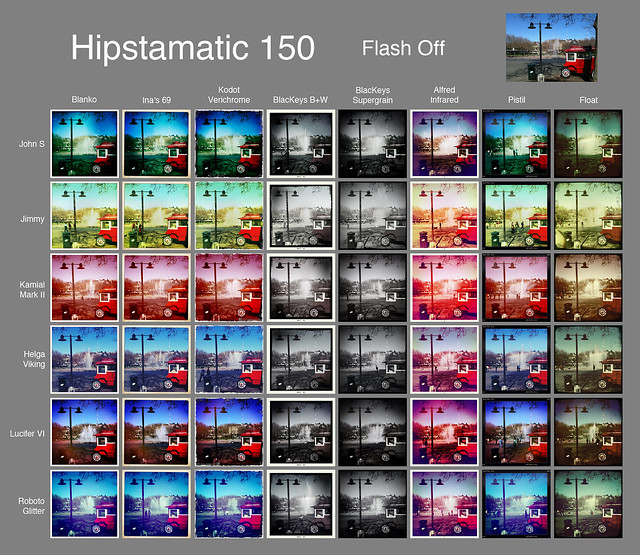
This is the most-used app I've downloaded on my phone, simply because it's so much fun. The Hipstamatic camera offers an unpredictable, analog-y feeling to any scene you snap. A multitude of lenses, films, and flash effects, I feel like I could take 20 pictures of the same thing and have a different, creative result each time.
Image courtesy of 3.bp.blogspot.com
Fantastic!

Bonus features: An easy button to upload to Facebook for sharing the ones that you feel rival Ansel Adams, and every-so-often themed photo contests for Hipsta-users.
Image courtesy of farm5.static.flickr.com
The $1.99 download comes with 3 lenses, 3 films, and 2 flashes - Plenty to be happy with. If you love it and want more options, you can purchase 'Hipstapaks' for $0.99 each, which also come with several lenses/films/flashes, and can be previewed before purchase. I have to say, I've absolutely zero complaints about this one.
Image courtesy of pocket-lint.com
Oh, snap.
Image courtesy of geeky-gadgets.com

Friday, September 24, 2010

An Apple A Day...

In the spirit of some of my own favorite bloggers, I'm going to try my hand at a little series.

First up: My fave smart phone applications. I'm an iPhone drone, but with so many jumping on the iPad, and the iPod Touch being practically everywhere, apps are pretty approachable even if you don't want to sign a contract with AT&T.
Image courtesy of blog.crowdspring.com
Being... thrifty, I try to stay in the Free-99 cent range as much as possible, and it has served me well.

Number 1 in the series? Shazam.
Image courtesy of AppScout.com
This amazing little technological snack allows you to, with the touch of a button, secure the artist name and song title through any speaker playing music. Simply open the app, click the screen to "shazam" the song, and the iDevice will 'listen', analyze, and produce the info complete with album art.

And of course offer a button to take you directly to iTunes to purchase. It is an Apple product, after all.

However, it will keep a catalog of the songs you've 'zam'd if you don't want to purchase right away. The only drawbacks I've found are minor: The free version of this app only allows 5 tags per month. If you want more prepare to shell out $4.99 for the "Shazam Encore" to receive unlimited tagging. Also, if there is any ambient noise the analysis can stutter a bit and need to be retried.

All-in-all a fab app that has nailed down new music, hard to find remixes, and even some songs from tv commercials for this gal.
Image courtesy of EndlessSimmer.com